Bandwidth Usage & Allotments Now Visible in the TeraSwitch Console
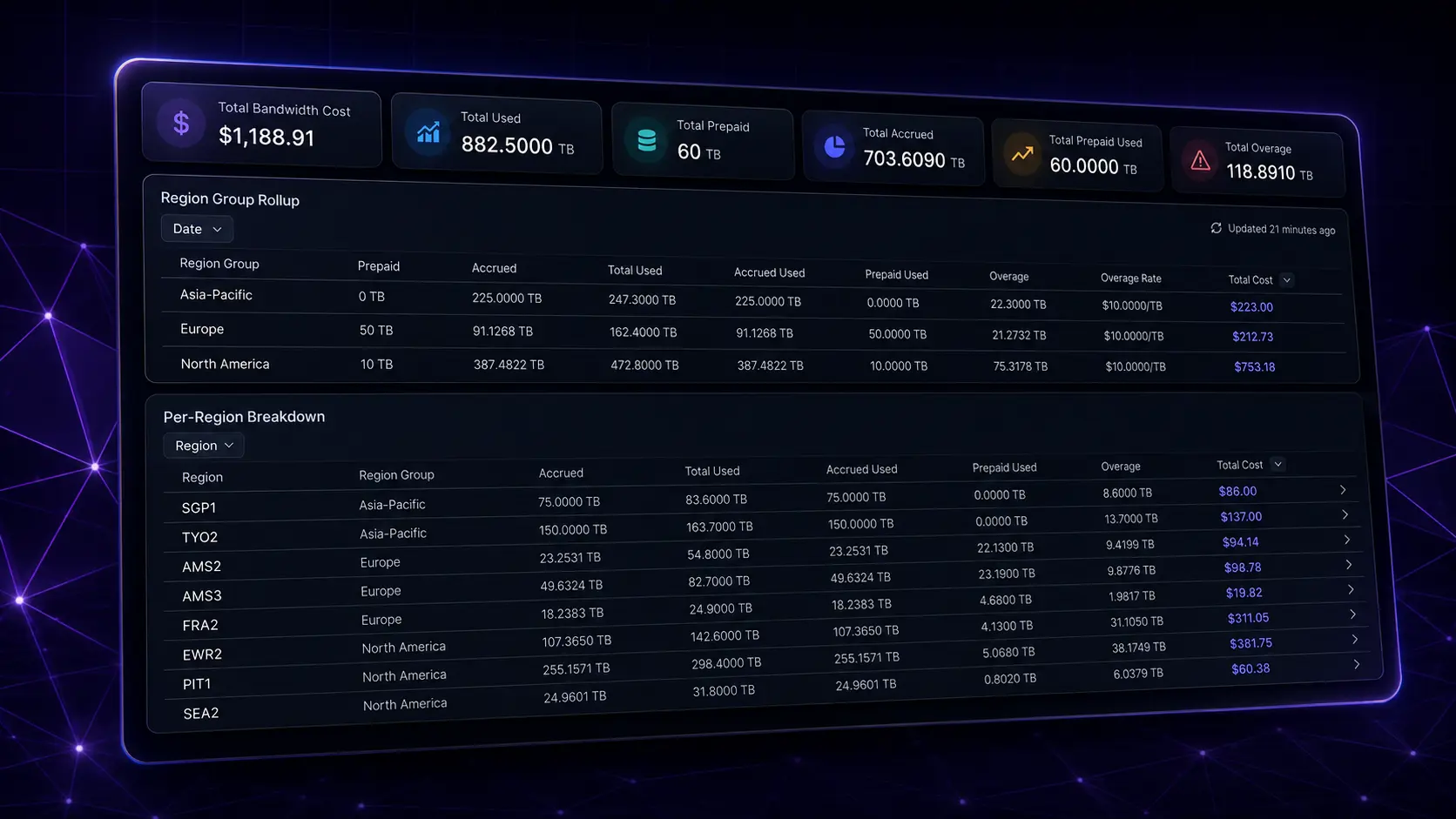
Building on bandwidth monitoring, you can now see your monthly bandwidth usage, allotments, and projected cost right in the Console — and get ready for prepaid bandwidth ahead of billing.
Where to Find It
- Billing → Usages → Bandwidth Usage — your monthly billed usage and projected cost, totaled across your account. Use the Date selector to change months, and click any region for a per‑service breakdown.
- Billing → Subscriptions — prepaid bandwidth (available July 2nd).
- Metal → Bandwidth — real‑time ingress/egress monitoring, viewable per project (from our earlier release).
Real‑time monitoring is per project. The Metal → Bandwidth view is scoped to the project you're in, so any team member — including those without billing access — can watch their project's live ingress/egress. If you separate teams or cost centers by project, each can monitor its own traffic independently. Billed Bandwidth Usage (the figure tied to pricing), by contrast, is totaled at the account level — see below.
How Bandwidth Is Measured
Billing is based on outbound (egress) transfer, and all egress is billable — your bandwidth charge reflects the full volume each service sends out. Ingress (inbound) transfer is not billed. Egress is measured per service and totaled for each billing month: each service is measured independently, pooled into its region, and then rolled up into the region group.
Want to see ingress as well as totals? Those are available in the real‑time Metal → Bandwidth view — but only egress factors into your bandwidth charge.
What's a Region Group?
A region group is a set of regions that share the same rates, pricing, and included bandwidth. For example, Pittsburgh (PIT1), Newark (EWR2), and Miami (MIA1) all belong to the North America region group, so usage in any of those regions is pooled into North America.
Region groups sit one level above your individual regions and exist only to determine how bandwidth is pooled and billed. This works in your favor: usage is pooled across every region in the group, so a heavy month in one region can be offset by a lighter month in another — and a single prepaid subscription covers the whole group, so you don't have to buy bandwidth region by region.
How Allotments Work
Each month, for every region group, your usage is covered in this order:
- Included bandwidth — your Metal services come with included bandwidth that accrues through the month (in proportion to how long each service runs), pooled across the group.
- Prepaid bandwidth — any prepaid bandwidth on your subscription for that group is applied next.
- Overage — usage beyond included + prepaid is billed at the group's overage rate, per TB.
You'll see all of this under Billing → Usages → Bandwidth Usage: region‑group totals, a per‑region breakdown, and per‑service detail.
How Included Bandwidth Works
What it is. Every Metal service comes with included bandwidth — egress that's already covered at no extra cost. In North America and Europe that's 150 TB per service, per month; in Asia‑Pacific it's 75 TB. Usage draws on included bandwidth first, then any prepaid bandwidth, and finally overage.
How it accrues. Included bandwidth isn't granted all at once on the 1st — it accrues steadily as a service runs (about 0.205 TB/hour for a 150 TB/month service). A service that runs the full month accrues its full 150 TB; one deployed halfway through accrues roughly 75 TB.
It's pooled across the region group. Included bandwidth from every service in the group is pooled together, so heavier and lighter services offset each other. Overage is based on the group's total usage versus its total included bandwidth — not service by service.
A worked example (North America). Say you run two services this month:
- Service A runs the full month → accrues its full 150 TB included.
- Service B is terminated halfway through → accrues only about 75 TB.
That's 225 TB of pooled included bandwidth for the group (150 + 75):
- Use 200 TB total → still under 225 TB. No charge — even though one service was short‑lived, the pool covers it.
- Use 285 TB total → 60 TB beyond your 225 TB included. That overflow is billed next:
- With a prepaid subscription ($1.25 / TB), the 60 TB costs $75.
- With no subscription, it's overage at $10 / TB — $600.
That gap is exactly what prepaid bandwidth is for: if you expect to run past your included allotment, a subscription covers the overflow at a fraction of the overage rate. You can adjust it up or down through the month and you're billed for whatever's on your subscription at month's end.
Bandwidth Is Account‑Level for Billing
Real‑time monitoring is per project, but billed bandwidth usage is account‑level:
- Pooling. Usage and included bandwidth are pooled across all projects in your account. If you run 50 services in North America under Project 1 and another 50 in North America under Project 2, their usage and included bandwidth pool together. Pooling globally works in your favor; we plan to add per‑project cost breakdowns in the future.
- Who manages billing. Prepaid subscriptions, allotments, and overage are account‑level. Account admins purchase and adjust prepaid bandwidth and see allotments, and users with the Billing role can view billing details. Other members can still monitor their project's real‑time bandwidth but won't see the billing side.
Prepaid Bandwidth (Subscriptions)
Prepaid bandwidth covers expected usage at a lower, locked‑in rate than overage:
- Purchased per region group, in 10 TB increments (starting at 10 TB), and pooled across all regions in that group.
- A flat monthly fee for the amount on your subscription that renews automatically each month until you cancel. You can hold one subscription per region group.
Adjust anytime — no proration. You're billed for the bandwidth on your subscription as of the end of the month, so change it as often as you like. For example: you start with a 50 TB subscription in North America; midway through the month you see you're heading into overage and bump it to 100 TB; later you realize you'll only use about 80 TB, so you set it to 80 TB before the month closes — and 80 TB is what you're billed for.
Cancelling. A cancelled subscription stays active through the end of the current billing period and won't renew. You can reactivate any time before it finalizes.
Region Group Pricing at a Glance
Each region group has its own included bandwidth, prepaid rate, and overage rate:
| Region Group | Included Bandwidth* | Prepaid Rate | Overage Rate |
|---|---|---|---|
| Europe | 150 TB/mo (0.205 TB/hr) | $1.25 / TB | $10.00 / TB |
| North America | 150 TB/mo (0.205 TB/hr) | $1.25 / TB | $10.00 / TB |
| Asia‑Pacific | 75 TB/mo (0.103 TB/hr) | $5.00 / TB | $10.00 / TB |
* Included bandwidth is granted per service and accrues hourly through the month (the per‑hour figure shows the rate of accrual). The prepaid rate is the locked‑in rate you pay on a subscription; the overage rate applies to any usage beyond included + prepaid.
What's Coming Next
Bandwidth billing hasn't started yet — this release is about visibility, so you can understand your usage and plan ahead before any charges apply.
Expect your invoice on August 1st, 2026 to include bandwidth charges for all usage in July 2026. Those charges are itemized per region group, with a per‑region usage breakdown within each group so you can trace exactly where your bandwidth came from. For each region group, your invoice shows:
- Service allocation — the included bandwidth applied to your usage (informational; no charge).
- Bandwidth subscription — the flat monthly fee for any prepaid bandwidth you hold, at the group's prepaid rate.
- Used — total bandwidth consumed across the group's regions.
- Overage — any usage beyond your included + prepaid allotment, charged at the group's overage rate.
Getting Started
- Review your usage at Billing → Usages → Bandwidth Usage.
- Click into a region to see which services drive your bandwidth.
- Use what you learn to plan the prepaid bandwidth you'll set up once billing goes live.
Questions? Contact support.